How to Use JSTL <form:checkbox> and <form:checkboxes> tag in Spring MVC
Here We Use :
JDK : Version: 1.8
IDE : Eclipse IDE for Enterprise Java Developers, Version: 2020-06
Build Tool : Maven,Version: 3.2.0
Spring : Version: 5.2.8
Server : apache-tomcat-9.0.34
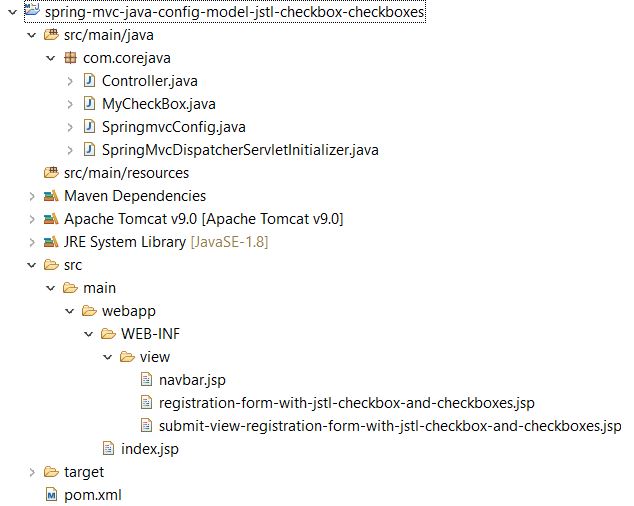
POM.XML
<project xmlns="http://maven.apache.org/POM/4.0.0" xmlns:xsi="http://www.w3.org/2001/XMLSchema-instance"
  xsi:schemaLocation="http://maven.apache.org/POM/4.0.0 http://maven.apache.org/maven-v4_0_0.xsd">
  <modelVersion>4.0.0</modelVersion>
  <groupId>com.corejava</groupId>
  <artifactId>spring-mvc-java-config-model-jstl-checkbox-checkboxes</artifactId>
  <packaging>war</packaging>
  <version>0.0.1-SNAPSHOT</version>
  <name>spring-mvc-java-config-model-jstl-checkbox-checkboxes</name>
  <url>http://maven.apache.org</url>

  <properties>
    <springframework.version>5.2.8.RELEASE</springframework.version>
    <maven.compiler.target>1.8</maven.compiler.target>
    <maven.compiler.source>1.8</maven.compiler.source>
  </properties>

<dependencies>
    <dependency>
        <groupId>org.springframework</groupId>
        <artifactId>spring-webmvc</artifactId>
        <version></version>
    </dependency>
    <dependency>
        <groupId>javax.servlet</groupId>
        <artifactId>javax.servlet-api</artifactId>
        <version>3.1.0</version>
    </dependency>
</dependencies>
  <build>
    <finalName>spring-mvc-java-config-model-jstl-checkbox-checkboxes</finalName>
    <plugins>
    <plugin>
        <groupId>org.apache.maven.plugins</groupId>
        <artifactId>maven-war-plugin</artifactId>
        <version>3.2.0</version>
    </plugin>
  </plugins>
  </build>
</project>
MyCheckBox.java
package com.corejava;
import java.util.ArrayList;
import java.util.Arrays;
public class MyCheckBox {

	private boolean subscribe1;
	private String subscribe2;
	private String[] hobbies;
	ArrayList collectionhobbies;
	private String[] selectedCollectionHobbies;

public MyCheckBox() {
	collectionhobbies=new ArrayList();
	collectionhobbies.add("Perfume");
	collectionhobbies.add("Shoes");
	collectionhobbies.add("Knife collecting");
	collectionhobbies.add("Element collecting");
	collectionhobbies.add("Ticket collecting");
	collectionhobbies.add("Coin collecting");
}

public boolean isSubscribe1() {
	return subscribe1;
}

public void setSubscribe1(boolean subscribe1) {
	this.subscribe1 = subscribe1;
}

public String getSubscribe2() {
	return subscribe2;
}

public void setSubscribe2(String subscribe2) {
	this.subscribe2 = subscribe2;
}

public String[] getHobbies() {
	return hobbies;
}

public void setHobbies(String[] hobbies) {
	this.hobbies = hobbies;
}

public ArrayList getCollectionhobbies() {
	return collectionhobbies;
}

public void setCollectionhobbies(ArrayList collectionhobbies) {
	this.collectionhobbies = collectionhobbies;
}

public String[] getSelectedCollectionHobbies() {
	return selectedCollectionHobbies;
}

public void setSelectedCollectionHobbies(String[] selectedCollectionHobbies) {
	this.selectedCollectionHobbies = selectedCollectionHobbies;
}

@Override
public String toString() {
	return subscribe1 + "  " + subscribe2 + " "+ Arrays.toString(hobbies);
}

}
SpringmvcConfig.java
package com.corejava;
import org.springframework.context.annotation.Bean;
import org.springframework.context.annotation.ComponentScan;
import org.springframework.context.annotation.Configuration;
import org.springframework.web.servlet.ViewResolver;
import org.springframework.web.servlet.config.annotation.EnableWebMvc;
import org.springframework.web.servlet.view.InternalResourceViewResolver;

@Configuration
@EnableWebMvc
@ComponentScan(basePackages="com.corejava")
public class SpringmvcConfig {

	@Bean
	ViewResolver getViewResolver(){
		InternalResourceViewResolver resolver=new InternalResourceViewResolver("/WEB-INF/view/", ".jsp");
		return resolver;
	}
}
SpringMvcDispatcherServletInitializer.java
package com.corejava;
import org.springframework.web.servlet.support.AbstractAnnotationConfigDispatcherServletInitializer;
public class SpringMvcDispatcherServletInitializer extends AbstractAnnotationConfigDispatcherServletInitializer {

	@Override
	protected Class[] getRootConfigClasses() {
		return null;
	}

	@Override
	protected Class[] getServletConfigClasses() {
		return new Class[]{SpringmvcConfig.class};
	}

	@Override
	protected String[] getServletMappings() {
		return new String[]{"/"};
	}

}
Controller.java
package com.corejava;
import org.springframework.ui.Model;
import org.springframework.web.bind.annotation.GetMapping;
import org.springframework.web.bind.annotation.ModelAttribute;
import org.springframework.web.bind.annotation.PostMapping;
import org.springframework.web.bind.annotation.RequestMapping;

@org.springframework.stereotype.Controller
@RequestMapping("home")
public class Controller {

	@GetMapping("/welcome")
	public String getNavbar() {
		return "navbar";
	}

	@GetMapping("/registration-form-with-jstl-checkbox-and-checkboxes")
	public String getReg(Model model) {
		MyCheckBox myCheckBox=new MyCheckBox();
		model.addAttribute("myCheckBox", myCheckBox);
		return "registration-form-with-jstl-checkbox-and-checkboxes";
	}

	@PostMapping("/submit-registration-form-with-jstl-checkbox-and-checkboxes")
	public String submitreg2(@ModelAttribute("myCheckBox") MyCheckBox myCheckBox,Model model) {
		System.out.println(myCheckBox);
		model.addAttribute("message","Data Save Successfully");
		return "submit-view-registration-form-with-jstl-checkbox-and-checkboxes";
	}
}
navbar.jsp
<html>
<head>
<title>Home</title>
</head>
<body>
<a href="registration-form-with-jstl-checkbox-and-checkboxes">JSTL Checkbox and Checkboxes Tag</a>
</body>
</html>
registration-form-with-jstl-checkbox-and-checkboxes.jsp
<%@ taglib uri="http://www.springframework.org/tags/form"  prefix="form"%>
<%@ include file="navbar.jsp" %>
<hr>
<form:form action="submit-registration-form-with-jstl-checkbox-and-checkboxes" modelAttribute="myCheckBox" method="post">
<table border="2">
	<tr>
	<td>Case 1: if you have single check box.then use <form:checkbox> tag.
	if you select then return true or false</td>
        <td><form:checkbox path="subscribe1"/>Subscribe1</td>
	</tr>
	<tr>
	<td>Case 2: if you have single check box.then use <form:checkbox> tag</td>
        <td><form:checkbox path="subscribe2" value="code4devops"/>Subscribe2</td>
	</tr>
	<tr>
	<td>Case 1: if you have multiple check boxes like hobbies. then use <form:checkbox>
	 tag</td>
        <td>
        <form:checkbox path="hobbies"  value="Cooking"/>Cooking
        <form:checkbox path="hobbies"  value="Painting"/>Painting
        <form:checkbox path="hobbies"  value="Coding"/>Coding
        <form:checkbox path="hobbies"  value="Home improvement"/>Home improvement
        <form:checkbox path="hobbies"  value="Watching movies"/>Watching movies
        </td>
	</tr>
	<tr>
    <td>Case 2: if you have multiple check boxes like hobbies. then use <form:checkboxes>
    tag (recommended Way)</td>
       <td>
       <form:checkboxes path="selectedCollectionHobbies" items="${myCheckBox.collectionhobbies}"/>
       </td>
    </tr>
	<tr>
		<td colspan="1"><input type="submit" value="SUBMIT"></td>
	</tr>
</table>
</form:form>
submit-view-registration-form-with-jstl-checkbox-and-checkboxes.jsp
<%@ taglib uri="http://java.sun.com/jsp/jstl/core" prefix="c" %>
<html>
<head>
<title>Registration</title>
</head>
<%@ include file="navbar.jsp" %>
<hr>
<body>
 <p style="color:green">${ message }</p>
<table border="2">
  <tr>
    <td>Case 1: Value</td>
        <td>${myCheckBox.subscribe1}</td>
  </tr>
  <tr>
    <td>Case 2: Value</td>
        <td>${myCheckBox.subscribe2}</td>
  </tr>
  <tr>
    <td>Selected Hobbies: </td>
        <td>
          <c:forEach var="hobbie" items="${myCheckBox.hobbies}">
              <c:out value="${hobbie},"></c:out>
          </c:forEach>
        </td>

  </tr>
  <tr>
    <td>Selected Collection Hobbies: </td>
        <td>
          <c:forEach var="hobbie" items="${myCheckBox.selectedCollectionHobbies}">
              <c:out value="${hobbie},"></c:out>
          </c:forEach>
        </td>

  </tr>
  <tr>
    <td colspan="1"><input type="submit" value="SUBMIT"></td>
  </tr>
</table>
</body>
</html>
index.jsp
<%response.sendRedirect("home/welcome");>